PowerPro Scripts for Total Commander

If you have some questions please first read Questions & Answers. Perhaps your question is answered already.


Copy Date & Time

Single

Batch

To/From List

File Age
Single-Click Search

Saved Search

Filename from Clipboard

Text from Clipboard

File by Size

Find Excluding...
Folder Tabs

Save/Load Tabs

Move Tab to Other Panel

Close All Tabs

Tab Tools

Highlight Current Tab

Load Tabs

View Tab File

Explorer Opens New Tab
Button Bars

Load Bar

Merge Bars

Button <-> Shortcut
Clipboard

Links to Images with Thumbnails

File List

File List with Dialog

Relative Link to File

Go to Path from Clipboard

Go to File from Clipboard

Put any Path/File to Clipboard
Tree Movement (description)

Down (+Xxcopy)

Up (+Xxcopy)

Down (+cmd)

Up (+cmd)

Down without parameters (+Xxcopy)

Up without parameters (+Xxcopy)
Change Directory Structure

Join SubDirectories

Decrease Nesting Level
File Group, One Panel Tab Operations

Copy to Many Targets

Delete Files in all Tabs

Search in all Tabs
File Comments (descript.ion)

Edit Comments of File Group

Copy/Move Comment

Clean/Update Comments
Selection

With Step

With Filter

Next Extension

Certain Number of Files

With Consecutive Numbers
Color Filters

Detect Color Filter

Directory Color

News (11.09.2008)


  • Text that needs editing by user (usually path to some file) is marked with blue;
  • Comments are marked with green;
  • Some scripts call other ones. Therefore it is not recommended to change script file names;
  • Scripts were developed and tested in the following configuration:
    • Windows 2000 SP3 English,
    • Total Commander 7,
    • PowerPro 4.5-4.8.
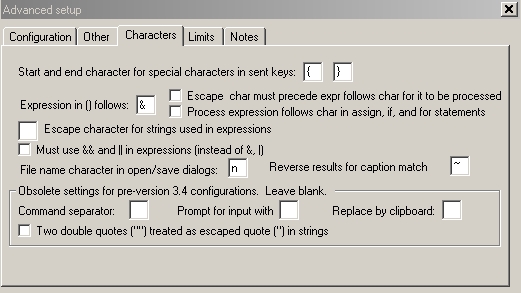
  • PowerPro configuration ("Setup\Advanced\Characters") is given on the screenshot.

Send mail

Other Scripts

Local Menu
Duplicate File
Subdirectory List
Load Setting for MultiRename
Quick Change WDX Plugin
Clear Sister Directories
Configuration Manager
Load WDX
Lister Extension
Check File Counter
Total Size of Files/Directories
Current Path in Next Instance
Run Any Command
File Index
Safe USB Unplugging
Batch "Make Directory"
Browse SubFolder

Auxiliary Scripts


ReadTabs

DebugCL

ParsePath

TreeDownCmd

TreeUpCmd

LowestDirCmd

MoveFile

Descript_ion

The user accepts responsibility for any direct or indirect loss or damage arising from the use (or misuse) of scripts and plugins provided.